
Compliance automation for startups: Get enterprise-ready without hiring a security team

You're three weeks from closing your biggest deal. The prospect sends over their security questionnaire. Question 12: "Please provide your SOC 2 Type II report." You don't have one. The deal stalls.
This is the classic compliance catch-22 for startups:
- Enterprise customers demand SOC 2 compliance before signing
- Traditional compliance takes 6-12 months and costs $50k-150k+
- "Fast" compliance tools promise automation but deliver expensive to-do lists
- You still need someone's full-time attention (which you don't have)
The real question isn't "Can I automate compliance?" It's "Can I actually get compliant without hiring a security team or grinding my product roadmap to a halt?"
What is compliance automation for startups?
Simple definition
Compliance automation for startups uses AI and software to handle the manual work of achieving security certifications like SOC 2, ISO 27001, and HIPAA—from implementing controls and monitoring systems to collecting audit evidence and coordinating with auditors—enabling companies to reach enterprise-grade security without dedicated security headcount.
If you're a startup founder, compliance probably won't be on your radar until a prospect asks for your SOC 2 report. Then, it's blocking deals. Here’s the rub: You need enterprise-grade security certifications, but you're running lean with a five-person engineering team, limited runway, and a product roadmap that can't afford delays.
This is exactly why "fast compliance" solutions are so appealing. They promise to solve your problem quickly and cheaply, letting you check the box and get back to building. But as we'll see, "fast" often becomes "expensive and slow" once you account for all the work these tools don't actually automate.
The "fast compliance" promise (and why it falls short)
Most compliance automation platforms market themselves as the easy button for SOC 2, ISO 27001, or HIPAA. They promise:
- ✅ Automated evidence collection from your tech stack
- ✅ Pre-built control frameworks and policy templates
- ✅ Real-time dashboards showing compliance status
- ✅ Integration with 100+ tools
- ✅ "Get audit-ready in 2-4 weeks!"
Sounds perfect, right? But here’s the problem: These tools automate documentation, not security work.
Here's what actually happens after you sign up:
- Week 1: Exciting! The dashboard shows you're 23% compliant. You have 47 open tasks.
- Week 4: You've connected all your integrations. Now you're 31% compliant. You have 89 open tasks. They're all assigned to your Head of Engineering, who also has a product roadmap to ship.
- Week 8: Engineering is furious. "Why do I need to configure MFA policies, set up vulnerability scanning, and document our incident response plan when we're supposed to be launching the new feature?"
- Week 12: You hire an MSSP consultant at $40k-60k to actually implement the controls the tool flagged. You realize you also need to buy separate tools for cloud security scanning ($24k/year), MDM ($18k/year), and pen testing ($10k+).
- Week 20: You're finally at audit-readiness. Total cost: ~$100k+. Total time: 5 months. Total engineering distraction: Immeasurable.
So, what really went wrong?
Your so-called compliance automation solution didn't actually automate all the work in the compliance process. You still needed humans to:
- Implement the 89 controls the tool identified
- Remediate the vulnerabilities the (separate) scanner found
- Configure MDM policies across all employee devices
- Coordinate fixes across engineering, IT, and operations
- Research compliance requirements when the tool's guidance was vague
- Interface with the auditor and respond to evidence requests
So instead of the promised "2-4 weeks to audit-ready," you've spent five months and over $100k cobbling together a compliance program. Your engineering team is frustrated because they've been pulled away from product work to configure security tools. You're managing relationships with five different vendors. And you still needed to hire expensive consultants to actually implement the controls your "automation" platform identified.
Here's what they’re not telling you: You didn't get automation. You got a sophisticated to-do list.
The better way: Automation that actually does the work
True compliance automation for startups means:
- AI agents that implement controls, not just track them
- Automated remediation workflows that route tasks to the right people
- Continuous monitoring that catches drift before audits
- Integrated security stack (GRC + cloud security + MDM + TPRM) in one platform
- Dedicated support that interfaces with auditors
Think of it as the difference between a task manager and a virtual security officer.
This is precisely why we built Mycroft. After spending years on both sides of the audit table—as auditors at firms like EY and as security practitioners implementing compliance programs—we saw the same pattern repeat: Companies bought "automation" platforms that generated work instead of eliminating it. The tools were good at documentation but terrible at execution.
Mycroft's Risk Operations Center was designed to actually do the security work, not just track it.
Our AI agents implement controls across your infrastructure. Our platform consolidates your entire security stack (GRC, cloud security, MDM, TPRM, pen testing) into one system. And our ROC team coordinates with auditors so your engineering team can stay focused on shipping features. It's compliance automation built for teams that don't have—and shouldn't need—dedicated security headcount.
Why startups especially need compliance automation (not just compliance software)
Startups operate in a fundamentally different reality than enterprises. You're moving fast with limited resources, making calculated bets on where to invest time and money. Every hour your engineering team spends on compliance is an hour not spent building the product that will generate revenue. Every dollar spent on security tools is a dollar that could extend your runway.
But you can't skip compliance. Enterprise customers won't sign contracts without it. Investors expect it. Regulatory frameworks require it. So startups are forced into an impossible position—achieve enterprise-grade security without enterprise-grade resources.
This is why the distinction between compliance software and true compliance automation matters so much at the startup stage. You don't have margin for error. You can't afford to buy a tool that creates more work. You need automation that actually eliminates the burden.
You probably don’t have dedicated security headcount
Most startups have zero dedicated security headcount until Series B. Compliance tools assume you have a CISO or security engineer available. But for most startups, the reality is that your head of engineering is stickhandling compliance on top of product work and myriad other tasks, like thought leadership.
Compliance automation that really serves your startup should eliminate the need for someone to babysit your compliance program.
Checkbox compliance hides many hidden costs
Here's what that "fast SOC 2" actually costs:
- GRC tool: $15k-30k/year
- Cloud security scanner: $24k/year
- MDM solution: $18k/year
- MSSP for implementation help: $40k-60k (conservative)
- Pen testing: $10k-15k
- Total: $107k-147k
And that's before accounting for the hidden cost—your engineering team's time. When your Head of Engineering is spending 10-15 hours per week wrestling with compliance tasks instead of building features, that's real opportunity cost.
What automation should solve: The right compliance automation should consolidate all of these vendors into a single platform and eliminate the implementation overhead entirely. Instead of managing five vendor relationships and coordinating work across separate tools, you should have one system that handles everything—from GRC to cloud security to device management.
Time-to-compliance directly impacts revenue
Every month you spend preparing for compliance is a month you can't close enterprise deals. The faster you can get audit-ready, the faster you can start winning contracts that require security certifications.
Let’s make that concrete: Say your average contract value (ACV) is between $50k-150k. If you lose just two deals because your team is hunkered down working on SOC 2, that’s $100k-300k in missed revenue per quarter.
What automation should solve: This is why time-to-audit matters so much. The right automation should compress that 6-12 month slog into 8-12 weeks by actually implementing controls for you, not just documenting what needs to be done. Every month you save is a month you can spend closing deals instead of gathering evidence.
Manual compliance doesn't scale
You pass your first SOC 2 audit. Woohoo! But now:
- Healthcare prospect needs HIPAA
- Finance prospect needs SOC 1
- EU customers need ISO 27001
With traditional tools, every framework means restarting the manual process. You're duplicating work across overlapping requirements, managing multiple vendor relationships, and coordinating the same implementation tasks repeatedly.
What automation should solve: True compliance automation handles multi-framework scalability intelligently. When you add ISO 27001 to your existing SOC 2 program, the platform should map overlapping controls automatically so you're not duplicating work. One implementation, multiple certifications—without multiplying your workload.
How compliance automation actually works for startups
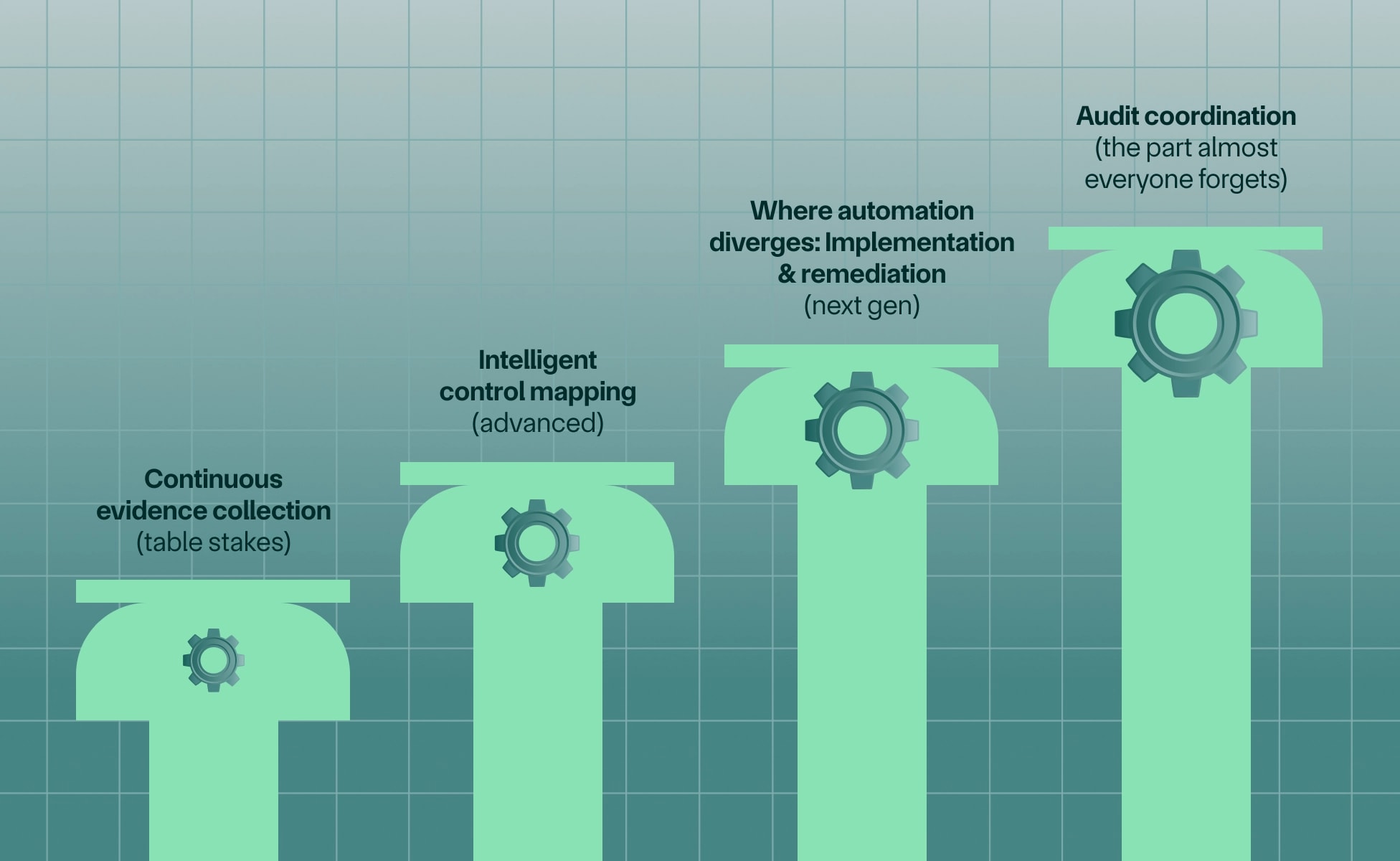
Not all compliance automation is created equal. Before you evaluate vendors, it's important to understand what different platforms actually deliver—and where they stop. The compliance automation market has four distinct tiers, each solving a different percentage of your total workload.
Most platforms won't tell you upfront which tier they occupy. They'll use the same language ("automated compliance," "AI-powered," "audit-ready in weeks") regardless of whether they're handling 20% of your work or 90%. So let's break down exactly what each tier does, and more importantly, what it doesn't.
1. Continuous evidence collection (table stakes)
What every compliance automation tool does:
- Integrates with your tech stack (AWS, Google Workspace, GitHub, etc.)
- Automatically collects logs, configs, and access reviews
- Creates an audit trail without manual screenshots
Reality check: This is table stakes—and it solves maybe 20% of your total compliance workload. I've watched countless startups sign up for a GRC platform, get excited about the integrations, and then hit a wall when they realize the platform isn't actually making them compliant. It's just showing them how far they have to go.
2. Intelligent control mapping (advanced)
Advanced platforms:
- Map your existing security posture to SOC 2 requirements
- Identify gaps automatically
- Provide control templates customized to your environment
Reality check: You still have to implement every single one of those missing controls. The platform identified the gaps—great. But now someone on your team needs to configure MFA across all your systems, set up automated backups, implement network segmentation, and document your incident response procedures. That "someone" is usually your Head of Engineering, who definitely didn't sign up for this.
3. Where automation diverges: Implementation & remediation (next gen)
Traditional tools stop here. Next-gen platforms like Mycroft continue:
AI agents that implement controls
- Auto-configure MDM policies across employee devices
- Deploy cloud security configurations via infrastructure-as-code
- Set up vulnerability scanning schedules
- Implement access control rules
Instead of creating a to-do list for your engineering team, the platform actually configures the security controls in your environment. An agent can deploy MFA requirements, set up automated backups, or configure logging—tasks that would otherwise require hours of engineering time.
Automated remediation workflows
- Vulnerability detected → Agent creates Linear/Jira ticket → Routes to correct engineer → Tracks to closure
- Employee offboarding → Agent revokes all access → Documents for audit
- Config drift detected → Agent alerts + provides fix → Implements if approved
The system doesn't just identify problems; it routes them to the right people with context, suggests fixes, and can implement approved solutions automatically.
Continuous monitoring with context
Not just "alert on everything" but:
- Prioritizes risks based on your specific environment
- Understands your tech stack relationships
- Reduces alert fatigue by 90%+
A good compliance automation platform knows the difference between "developer installed unapproved software on their laptop" (high risk) and "developer updated their IDE" (low risk). Context matters.
4. Audit coordination (the part almost everyone forgets)
What actually happens during a SOC 2 audit:
- Auditor requests 40-60 pieces of evidence
- You spend 2-3 weeks gathering, formatting, and explaining
- Auditor asks follow-ups, you scramble again
- This happens for both Type I and Type II
How advanced automation handles it:
- Risk Operations Center (ROC) analysts interface directly with the auditor
- Evidence auto-generated in auditor-preferred format
- You stay in the loop but aren't doing the work
The ROC team becomes your audit coordination layer. They understand what auditors need, how to format evidence properly, and how to respond to follow-up questions. You're not spending hours in back-and-forth emails trying to explain your security architecture.
Checklist: What to look for in compliance automation
When evaluating compliance automation platforms, use this checklist to assess whether you're buying a complete solution or just the first piece of a multi-vendor stack.
| Capability | Why It Matters | Tools You’re Considering: | ||
|---|---|---|---|---|
| Mycroft | Solution #2 | Solution #3 | ||
| All-in-one platform | ||||
| Cloud security scanning | Without this, you need a separate $24K/year tool like Wiz or Orca | ✅ | ||
| Device management (MDM) | Separate MDM solutions cost $18K/year; fragmented visibility creates gaps | ✅ | ||
| Vulnerability management | Scanning, prioritization, and remediation tracking in one place | ✅ | ||
| Third-party risk management | Automated vendor assessments eliminate manual questionnaire back-and-forth | ✅ | ||
| Pen testing coordination | Scheduling, scope definition, and remediation validation | ✅ | ||
| Custom control frameworks | ||||
| Tailored to your tech stack | Cookie-cutter frameworks don't fit hybrid or complex environments | ✅ | ||
| Adapts as you scale | Your compliance program should grow with your infrastructure | ✅ | ||
| AI-powered implementation | ||||
| Agents that configure, not just detect | If the platform only monitors, your team still does all the work | ✅ | ||
| Automated remediation workflows | Vulnerabilities should route to engineers with context and track to closure | ✅ | ||
| Multi-framework support | ||||
| SOC 2, ISO 27001, HIPAA, GDPR, etc. | Avoid restarting from scratch when you need additional certifications | ✅ | ||
| Shared controls across frameworks | One MFA implementation should satisfy 5+ framework requirements | ✅ | ||
| Dedicated support/ROC service | ||||
| Real security experts (not just chatbots) | When auditors ask complex questions, you need humans who understand compliance | ✅ | ||
| Auditor coordination included | ROC team handles evidence requests and follow-ups | ✅ | ||
| Nice to haves: These features enhance the experience but aren't dealbreakers if the must-haves above are covered: | ||||
| Not dealbreakers |
| ✅ | ||
Compliance automation ROI for startups
The traditional "always-on" compliance stack can really add up. Here are some ballpark figures a startup-scale traditional stack (not full enterprise MSSP) can expect to pay annually:
- GRC tool: $15k-30k
- Cloud security scanner: $24k
- MDM solution: $18k
- MSSP for implementation help: $40k-60k
- Pen testing: $10k-15k
- TOTAL: $107k-147k / year
A consolidated platform approach doesn't just save money—it eliminates the coordination overhead of managing multiple vendor relationships. One contract, one integration, one support team.
Case study: Weave
Weave, a healthcare comms platform, consolidated their entire security stack with Mycroft's Risk Operations Center. Before Mycroft, they were managing separate vendors for GRC, cloud security, and device management, plus relying on consultants.
By switching to Mycroft's unified platform, Weave reduced their annual security spend by over $80K while simultaneously improving their security posture and achieving SOC 2 Type II certification in under 12 weeks.
Read the full Weave case study
It might be a cliché, but time really ismoney: For startups trying to move upmarket, three months can mean the difference between hitting or missing quarterly revenue targets. The faster you can demonstrate security compliance, the faster you can close enterprise deals.
Hidden value
Beyond the direct cost and time savings, compliance automation delivers strategic advantages that are harder to quantify but equally important to your business growth. These benefits compound over time, creating separation between startups that treat compliance as a checkbox exercise versus those that build it into their operational foundation.
- Faster deal cycles = higher win rates: When prospects ask for your SOC 2 report and you can provide it immediately, you remove friction from the sales process. Enterprise buyers are evaluating multiple vendors—the one that can prove security fastest often wins.
- Multi-framework readiness opens new markets: Healthcare opportunities require HIPAA. Financial services need SOC 1. EU customers expect ISO 27001. With a platform that supports multiple frameworks, you're not saying "we're working on that certification"—you're already compliant.
- Engineers stay focused on your product roadmap: Your engineering team was hired to build features that generate revenue, not to spend 15 hours a week configuring MDM policies and chasing audit evidence. Automation gives them that time back.
- Continuous compliance reduces re-audit stress: Once you're compliant, staying compliant becomes automatic. Controls don't drift, evidence collection happens continuously, and your annual re-audit becomes a formality instead of a scramble.
Conclusion: Stop treating compliance as a checkbox
Compliance automation for startups should mean one thing: getting to enterprise-grade security without enterprise-grade headcount.
The right platform doesn't just collect evidence—it implements controls, remediates vulnerabilities, manages third-party risk, and coordinates your audit. All while your engineering team ships features.
If you're evaluating compliance automation:
- Don't settle for glorified task managers
- Demand actual implementation, not just monitoring
- Choose platforms that consolidate vendors, not add to them
Mycroft's AI-powered Risk Operations Center replaces your entire security stack—GRC, cloud security, MDM, TPRM, and pen testing—in one platform.
Book a demo to see how startups get SOC 2 ready in 8-12 weeks without hiring a security team.
FAQs
How much does compliance automation cost for startups?
Compliance automation costs vary based on what's included. Basic GRC tools (evidence collection and control mapping only) typically range from $15k-30k annually. However, true compliance automation that includes implementation, monitoring, and remediation requires additional tools—cloud security scanning ($24k/year), MDM ($18k/year), pen testing ($10k-15k), and often MSSP support ($40k-60k)—bringing total costs to $107k-147k.
All-in-one platforms like Mycroft that consolidate these capabilities into a single Risk Operations Center typically can significantly reduce costs, while eliminating vendor management overhead.
Can I get SOC 2 compliant in under 3 months?
Yes, with the right automation platform. Traditional approaches take 6-12 months because they require significant manual work—implementing controls, gathering evidence, coordinating with auditors. Next-generation platforms with AI agents that actually implement controls (not just monitor them) can compress this timeline to 8-12 weeks.
The key is choosing automation like Mycroft that handles implementation and remediation, not just evidence collection. If your platform is generating to-do lists for your engineering team, you're not actually automating the work—you're just automating the documentation.
What's the difference between compliance automation and GRC software?
GRC (Governance, Risk, and Compliance) software focuses on documentation—policy management, control mapping, evidence collection, and audit trail creation. It's essentially a sophisticated tracking system that helps you organize your compliance program.
Compliance automation includes GRC functionality but goes further by actually implementing security controls, remediating vulnerabilities, managing devices, scanning cloud infrastructure, and coordinating third-party risk assessments. Think of GRC as the clipboard that tracks compliance tasks; compliance automation is the platform that completes them.
For startups without dedicated security teams, this distinction is critical. GRC software still requires humans to do the work. True automation like Mycroft eliminates that burden.
Do I still need to hire a security engineer if I use compliance automation?
It depends on the platform. Checkbox compliance tools (traditional GRC software) still require someone on your team—typically your Head of Engineering or a dedicated security hire—to implement controls, remediate findings, and coordinate the audit process.
Platforms with Risk Operations Center (ROC) services (like Mycroft) provide the security expertise as part of the platform. The ROC team handles control implementation, vulnerability remediation, and auditor coordination, eliminating the need for dedicated security headcount until you've scaled significantly (typically Series B or later).
Most startups can achieve and maintain SOC 2, ISO 27001, and HIPAA compliance with a ROC-enabled platform and no dedicated security hires. As you grow and security complexity increases, you may eventually bring security leadership in-house, but the platform continues handling the operational burden.
What compliance frameworks can be automated?
Most major security and privacy frameworks can be automated, including:
- SOC 2 (most common for B2B SaaS startups)
- ISO 27001 (international security standard)
- HIPAA (required for healthcare data)
- GDPR (EU privacy regulation)
- PCI DSS (payment card security)
- SOC 1 (financial controls, often required by enterprise customers)
- CMMC (Department of Defense contractors)
- FedRAMP (U.S. government cloud services)
Advanced platforms like Mycroft map controls across frameworks to minimize duplication. Many security requirements overlap—strong access controls, encryption, logging, and incident response are universal. A good automation platform implements these controls once and maps them to all relevant frameworks.
This means adding ISO 27001 after you're already SOC 2 compliant might only require 20-30% additional work instead of starting from scratch.
How is AI used in compliance automation?
AI in compliance automation serves several functions:
- Evidence analysis: AI agents can review logs, configurations, and access controls to automatically extract audit evidence and identify gaps. Instead of manually screenshotting your AWS settings, the agent pulls the data, validates it meets requirements, and formats it for auditors.
- Control implementation: AI can deploy security configurations across your infrastructure—setting up MFA requirements, configuring backup policies, implementing network segmentation. This moves beyond monitoring into actual security work.
- Remediation workflows: When vulnerabilities are detected, AI agents can create tickets, route them to the appropriate engineer with context, suggest fixes, and track resolution. Some platforms can even implement approved fixes automatically.
- Risk prioritization: AI understands your environment and prioritizes alerts based on actual risk. Not all vulnerabilities matter equally—AI considers your specific tech stack, data flows, and threat model to surface what actually needs attention.
- Auditor response generation: During audits, AI can help draft responses to evidence requests, pull relevant documentation, and ensure answers align with your implemented controls.
The key difference in next-generation platforms is that AI doesn't just analyze and recommend—it actually executes security tasks that would otherwise require engineering time.
How is Mycroft different from Vanta or Drata?
Vanta and Drata are GRC platforms focused on evidence collection, control mapping, and audit preparation. They excel at automating documentation and creating audit trails through integrations with your tech stack.
Mycroft is a Risk Operations Center that includes GRC functionality but goes significantly further by actually implementing security controls and managing your entire security stack. Key differences:
- Implementation vs. documentation: Vanta and Drata identify what controls you need and monitor compliance. Mycroft's AI agents implement those controls—configuring MDM policies, deploying cloud security settings, managing vulnerability remediation.
- Consolidated platform: Vanta and Drata handle GRC. You still need separate vendors for cloud security scanning, MDM, pen testing, and often MSSP support. Mycroft consolidates all of these into one platform.
- ROC service: Mycroft's Risk Operations Center team handles the actual security work—implementing controls, coordinating audits, and managing remediation workflows. With Vanta or Drata, your team does this work; the platform just documents it.
- Total cost: A typical Vanta or Drata implementation costs $15K-30k for the platform, plus $77k-117k for the additional tools and services you need (cloud security, MDM, MSSP, pen testing).
Both approaches can get you compliant. The difference is whether you're buying a tracking system or a virtual security team.
Does Mycroft replace my entire security stack?
Yes. Mycroft consolidates:
- GRC software (policy management, control frameworks, evidence collection)
- Cloud security scanning (AWS, Azure, Google Cloud vulnerability detection)
- MDM (device management and security for employee laptops and mobile devices)
- Vulnerability management(scanning, prioritization, remediation tracking)
- Third-party risk management (vendor assessments, questionnaires, ongoing monitoring)
- Pen testing coordination (scheduling, scope definition, remediation validation)
Instead of managing 5-7 vendor relationships with separate contracts, integrations, and support teams, you have one platform with one ROC team handling all security operations.
The platform doesn't just aggregate these functions—it connects them. When a vulnerability is detected in your cloud infrastructure, the ROC creates a remediation ticket, routes it to the right engineer, tracks it to closure, and updates your compliance posture automatically. This integration eliminates the manual coordination that makes traditional multi-vendor stacks so time-consuming.
Is Mycroft only for startups or can it scale to enterprise?
While Mycroft is particularly valuable for startups that lack dedicated security teams, the platform scales to enterprise complexity. Current customers range from early-stage startups to publicly listed companies managing complex security programs across multiple business units.
The platform's architecture supports:
- Multi-framework compliance (SOC 2, ISO 27001, HIPAA, FedRAMP, etc.)
- Hybrid infrastructure (cloud, on-premise, multi-cloud environments)
- Custom control frameworks tailored to specific regulatory requirements
- Complex vendor ecosystems with hundreds of third-party relationships
The ROC service model actually becomes more valuable as you scale. Enterprise security teams are typically under-resourced relative to their scope—the ROC augments your existing team rather than replacing it. As you grow, you might bring security leadership in-house, but the platform continues handling operational tasks that would otherwise require adding multiple security engineers.
Many Mycroft customers start at the seed or Series A stage and continue using the platform through Series B, C, and beyond as their primary security operations infrastructure.