
How to automate SOC 2 compliance: A former auditor's step-by-step guide

TLDR:
- SOC 2 compliance automation uses software to collect audit evidence and test controls continuously against the Trust Services Criteria.
- While automation handles the evidence work, your team still owns scoping and making sure controls fit how your business operates.
- The biggest time savings happen before fieldwork, during readiness and evidence mapping.
A prospect's security team sends over its vendor questionnaire, and the first item asks for your SOC 2 (System and Organization Controls 2) report. The deal is ready to close. But that report doesn't exist yet, and the evidence behind it is scattered across spreadsheets and screenshots.
All too often I see these vendor requirements as the catalyst for SOC 2 automation. It's a sensible instinct. Good automation software quickly collects evidence and tests security controls on a schedule, so problems surface long before the auditor arrives.
What the demos skip, however, is that while automation handles the evidence, someone still has to run the program. And audits rarely go smoothly on the first pass. Lazarus Alliance's 2026 SOC 2 Audit Benchmark Report reviewed 75 completed SOC 2 examinations and found that 71% had at least one exception. Even more telling: 88% needed at least one extra round of evidence before the auditor could finish.
This guide walks through how to automate SOC 2 compliance one stage at a time. For each stage, you'll see what automation takes off your plate and where your team still needs to make the call. I've spent years testing controls as an auditor, and now building a platform that runs them, so this perspective comes from both sides of the table.
What is SOC 2 compliance automation?
SOC 2 is an attestation, not a certification: An independent certified public accountant (CPA) firm examines your controls and issues a report with its opinion. Compliance automation prepares the evidence for that review, but it doesn't replace an auditor. For more background on the SOC 2 basics, start with our complete guide to SOC 2 compliance.
In practice, compliance automation connects to the systems where your controls live, like your cloud infrastructure and identity provider (i.e., the system that manages employee logins, such as Okta or Microsoft Entra ID), and pulls evidence on a schedule. An engineer no longer has to screenshot an access review the week before fieldwork. The platform records the review when it happens, with a timestamp the auditor can rely on.
5 reasons why manual SOC 2 compliance doesn't scale
A manual SOC 2 process is possible. A motivated engineer and a few long weekends will get plenty of companies through their first Type I audit, which tests whether your controls are designed properly at a single point in time. The trouble starts when the same approach has to survive a growing headcount and Type II's lengthy observation period. Here's why:
Every audit adds to the evidence pile
SOC 2 is evidence-heavy by design. The average examination in the Lazarus Alliance benchmark involved about 1,450 evidence artifacts. First-time audits needed 2.1 rounds of clarification on average, compared with 1.3 for renewals. Each round means an engineer stops product work to find or redo a piece of evidence.
Multiple audits can happen each year
Few companies stop at SOC 2. According to A-LIGN's 2026 Compliance Benchmark Report, 97% of organizations now conduct at least two audits a year, and 25% cite multiple audits as one of their biggest compliance challenges. Once the International Organization for Standardization's ISO 27001 certification or HIPAA (the Health Insurance Portability and Accountability Act) compliance hits the calendar, spreadsheets that barely held one audit together start working against you. The same access review gets collected three times in three formats.
Nobody owns it full-time
In most companies, SOC 2 doesn't have a dedicated owner. It lands on the information technology (IT) team or a senior engineer, while the evidence sits with human resources (HR), DevOps, finance, and whoever manages vendors. Every request turns into a Slack thread, and every thread waits on someone whose real job is something else.
Deals move faster than audits
A first SOC 2 Type II can take up to a year once you count readiness and the observation period. Sales cycles rarely wait that long. When a prospect's security review asks for the report, the deal sets the deadline, and the audit calendar has to play catch-up. Teams end up squeezing months of work into weeks to close a deal. For a realistic view of timing, see how long SOC 2 takes for startups and SaaS companies.
Proof has to hold for months
A Type I report checks whether your controls are designed properly at a single point in time. A Type II report tests whether they actually operated throughout an observation period, which commonly runs anywhere from 3 to 12 months. Auditors pull samples from across that window, so a skipped quarterly access review or one unapproved change can become an exception. A screenshot taken the week before fieldwork doesn't prove anything about the other 11 months. We cover the observation period in more detail in SOC 2 Type II compliance: What it actually means.
What can (and can't) be automated for SOC 2?
Today, technology is standard in audits. A-LIGN found that 95% of organizations already use it in their audit and assessment processes. But not every part of the process can be automated.
This is most obvious in the typical areas where audits fail. Most exceptions stem from day-to-day operations, where evidence is collected automatically. The judgment calls behind that evidence, like who should have admin access or which risks you're willing to accept, still need an expert to weigh in.
How AI changes SOC 2 automation (and why it doesn't replace your team)
Traditional automation follows rules: Pull this list, check that setting, flag anything that fails. AI agents are miles ahead. They can draft documents like risk assessments and system descriptions, and sort hundreds of alerts down to the few that actually need attention. That moves a lot of manual work off your team's shoulders.
What AI can't do? Take responsibility. Every SOC 2 report includes management's written assertion that its controls are in place, and your auditor is testing whether a real person stands behind each one. AI can prepare the decision, but someone on your team still has to make it.
Automation vs AI vs humans: Who handles the 7 most common SOC 2 exceptions
| Exception area | Share of audits with an exception here* | What automation tools handle | Where AI agents can support | Where a person still needs to sign off |
|---|---|---|---|---|
| Access control and user provisioning | 51% | Pulls user lists from your identity provider and HR system, and flags accounts that outlive an employee's last day | Flags unusual access first | Approves privileged access and access reviews |
| Change management | 41% | Confirms each merged change had an approval and passed its tests | Drafts the after-the-fact record from commit and ticket history | Approves any emergency changes and confirms why the normal process was skipped |
| Logging, monitoring, and alerting | 37% | Checks that logging is on for in-scope systems and alerts are firing | Triages and groups alerts | Decides which alerts need action |
| Risk assessment and vendor management | 32% | Tracks vendor SOC reports and sends reminders before they expire | Drafts vendor risk ratings and the annual risk assessment | Approves vendor risk ratings and the annual risk assessment |
| System description accuracy | 28% | Keeps a current inventory of in-scope assets | Drafts a system description from your inventory | Confirms the description matches how the product really works |
| Security configuration and vulnerability management | 24% | Scans cloud configuration and flags vulnerabilities past their deadline | Ranks findings by severity and suggests fixes | Accepts risk on findings not fixed, and documents why |
| Incident response and continuity testing | 19% | Stores plans and reminds owners when tests are due | Drafts test scenarios and the post-test summary | Runs the test and agrees on what changes afterward |
*Exception rates pulled from Lazarus Alliance's 2026 SOC 2 Audit Benchmark Report.
If you want the full case for where automation stops, we've covered it in SOC 2 automation: Tools, benefits, and limitations. The rest of this guide focuses on the how.
How to automate SOC 2 compliance
The SOC 2 process follows a predictable lifecycle. Each of the 7 stages below covers what automation takes on and what stays with your team, so you can see where the workload actually drops.
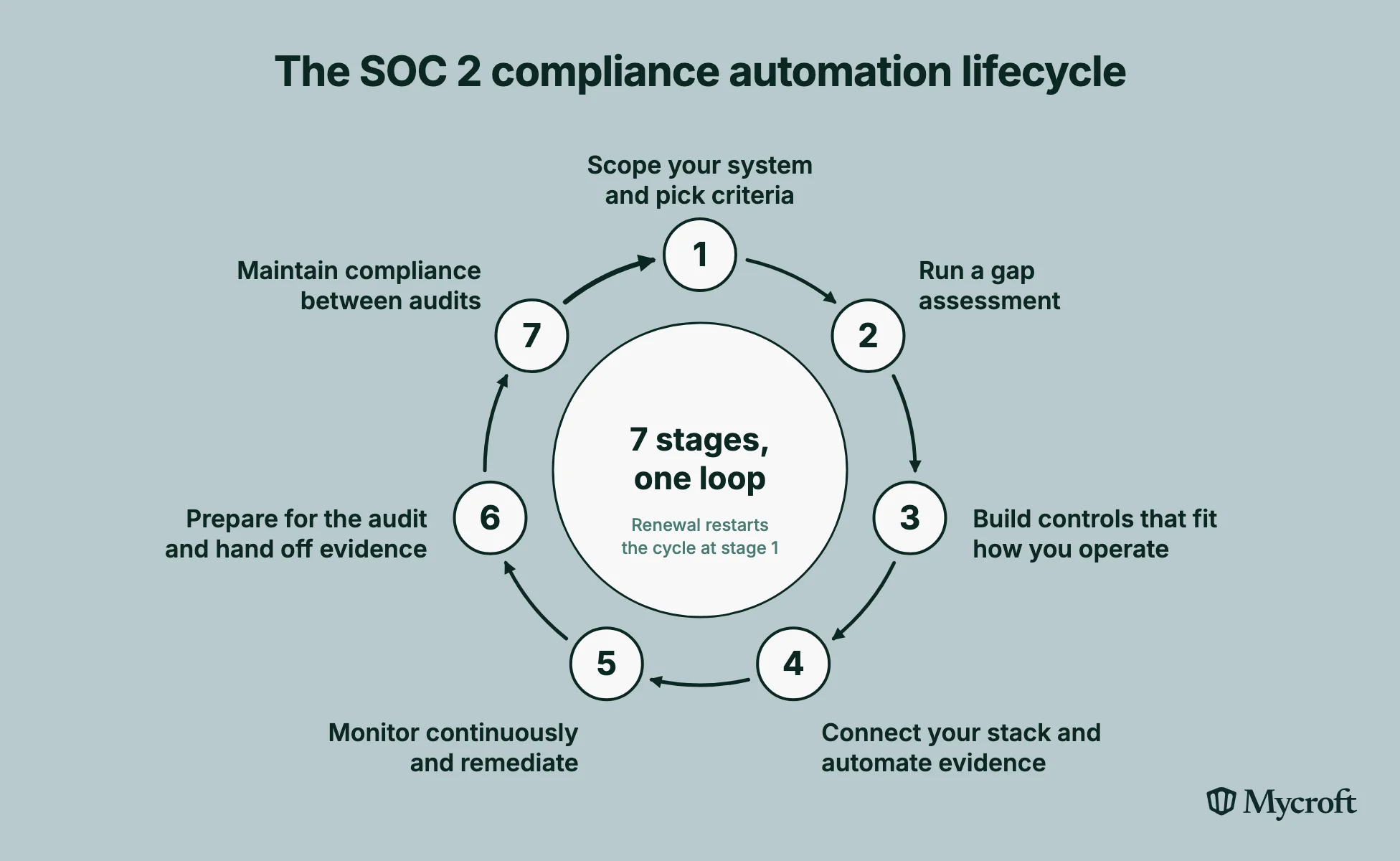
Stage 1: Scope your system and pick your Trust Services Criteria
Scoping is the one stage automation can't do for you, and it decides the size of everything that follows. You choose which systems and data are in scope, and which criteria your customers need. Integrations help by building an asset inventory straight from your cloud accounts and identity provider, so you scope against what exists rather than what someone remembers.
For a first report, start with Security, since it's the one mandatory Trust Services Criteria (TSC) category required in every SOC 2 report. Each added criterion expands the controls and evidence you'll need to maintain, and a clean Security-only report beats a rushed multi-criteria one.
Stage 2: Run a gap assessment against the framework
Connect your stack before you assess anything. Once the integrations are live, automated checks can surface compliance gaps within hours, such as a production account without multi-factor authentication (MFA).
A good platform will also rank those gaps by severity and produce a report you can work from. Deciding what to tackle first is still your team's call, since it depends on the data you hold and which deals are waiting on the report.
Stage 3: Build controls that reflect how you actually operate
While several control templates are available, they can cause more headaches than they're worth if they don't fit how your company operates. For example, a template might assume every engineer reaches production through your identity provider, when your team actually uses a shared bastion host. That control could pass a Type I assessment, since the design looks right on paper, but it would fail a Type II assessment once the auditor samples real access over six months.
"A lot of automation gives you a cookie-cutter approach to SOC 2. It's what we call SOC-in-a-box. The real question is whether your controls actually reflect your operations."
Look for a platform that lets you edit controls or write your own, then maps each one to the TSC for you.
Stage 4: Connect your stack and automate evidence collection
Most SOC 2 evidence already exists in your systems. To automate the evidence collection process, pull it via integrations from the following sources:
- Cloud infrastructure and configuration (e.g., encryption settings, network rules, backup status, and logging configuration)
- Identity, access, and HR systems (e.g., user lists, MFA status, onboarding and offboarding dates, and access review records)
- Code repositories and change management workflow (e.g., pull request approvals, test results, and deployment history)
- Employee devices and endpoints (e.g., disk encryption, screen lock, and operating system updates, reported through mobile device management)
What matters to an auditor is whether each item shows a date, a system identifier, and enough context to prove the control ran. The previously mentioned Lazarus Alliance's 2026 SOC 2 Audit Benchmark Report lists undated screenshots, policies with no operational proof, and incomplete Type II samples among the most common evidence deficiencies.
Stage 5: Set up continuous monitoring and remediation workflows
Continuous monitoring runs your control tests every day instead of once a year. On its own, though, monitoring produces alerts, and alerts without owners turn into noise. Every failed check needs a named owner and a deadline, with an escalation path for when that deadline slips. Route it into the ticketing tool your engineers already use, so compliance workflows run where the work already happens.
"There are a lot of tools that tell you what's wrong, but not that many that tell you what you should do about it." — Mike Kim, Co-founder and CEO, Mycroft
Stage 6: Prepare for the audit and hand off the evidence requests
When evidence is already mapped to the criteria, audit preparation stops being a scramble. You give the auditor access, and they sample what they need. Formal fieldwork typically runs six to 10 weeks. Pre-mapping matters here, according to Lazarus Alliance's 2026 SOC 2 Audit Benchmark Report, since 88% of the examinations still needed at least one extra round of evidence.
During fieldwork, the auditor will still have questions no integration can answer, like why a control changed mid-period or how an exception was handled. Decide in advance who owns those conversations and who drafts management responses, so requests don't stall in someone's inbox.
Stage 7: Maintain continuous compliance between audits
Continuous compliance means your renewal is another checkpoint. The controls, integrations, and evidence history you built for the first report keep running. Audit readiness stops being a project you maintain a couple of times a year.
That work also carries over when you add other compliance frameworks. For example, many SOC 2 controls map directly to ISO 27001, which makes it far easier to manage compliance across multiple frameworks. This comparison of ISO 27001 vs SOC 2 for startups covers where the two overlap.
| Stage | What automation handles | What your team owns |
|---|---|---|
| 1. Scope system | Asset inventory from connected systems | Which systems and criteria are in scope |
| 2. Do gap assessment | Automatic checks against the criteria | Prioritizing gaps by business risk |
| 3. Build controls | Policy drafts and control templates | Controls that match how you operate |
| 4. Collect evidence | Scheduled evidence collection | Evidence that can't be pulled from a system |
| 5. Monitor continuously | Continuous control tests and alerts | Remediation owners and deadlines |
| 6. Prep and hand off for audit | Evidence mapped to criteria, auditor access | Answering the auditor's follow-up questions |
| 7. Maintain compliance | Drift detection and renewal readiness | Scope changes and risk decisions |
How does SOC 2 automation change the audit timeline?
A typical SOC 2 engagement takes 3 to 9 months end to end. That covers readiness, remediation, fieldwork, and the final report, with Type I at the shorter end and Type II at the longer end.
For a Type II, plan for the observation period separately. It commonly runs 3 to 12 months, and no tool shortens that timeframe. Automation shortens everything around it: You reach readiness sooner, the observation window opens earlier, and you arrive at fieldwork with clean evidence. Renewals move faster too, since the evidence history is already in place.
The difference between a manual process and an automated SOC 2 program shows up clearly in customer timelines. For example, Unified, a data infrastructure company, spent 11 months and 25 days getting SOC 2 with a previous provider. With Mycroft, the team completed its SOC 2 Type II attestation in six weeks, with AI-generated first documentation drafts doing much of the heavy lifting.
5 key features of SOC 2 compliance automation software
The following features of SOC 2 compliance automation software will help reduce your workload and make each audit more predictable.
Integrations that cover your real stack
Count the integrations that match the systems you run today. If your production database or your on-premises servers sit outside the platform, someone on your team is back to gathering evidence by hand. Ask how the platform handles systems it can't connect to directly, since you'll have a few.
Control tests you can inspect and customize
An automated test that turns green tells you very little if you can't see what it checked. Look for control tests you can open and adjust to match your own compliance controls. Auditors ask how a test works, and a green checkmark with no explanation is like handing in the correct answer to a math problem without showing your work.
Risk management that drives remediation
Good risk management turns findings into assigned, tracked work. The platform should centralize your risk register, link each risk to the controls that address it, and give security teams visibility into what's overdue. Without that, you have a list of problems, but no path to fix them.
Cross-framework mapping
If ISO 27001, HIPAA, or the Cybersecurity Maturity Model Certification (CMMC) is on the roadmap, the platform should map a single control and its evidence to every framework that needs it. This lets compliance teams streamline work across frameworks instead of rebuilding it from scratch for each one.
Human expertise behind your automation tool
Automation tools still need someone to tune integrations, triage alerts, chase remediation, and talk to the auditor. In most growing companies, that someone is a security team of one, or an engineer who already has a full-time job. Before you buy, ask who will run the platform day to day. A tool that includes human expertise as part of the platform offering can take that work off your team without adding headcount, and that's often worth more than any single feature on this list.
How does Mycroft automate SOC 2 compliance?
Mycroft was built around the 5 features above, including human expertise. Here's how each one shows up in practice:
- Integrations: Collects audit evidence automatically from your cloud infrastructure, apps, and systems, and consolidates your security stack into one platform
- Customizable controls: Supports custom controls built around how your business operates, plus an artificial intelligence (AI) policy generator for tailored security policies
- Risk management: Identifies and prioritizes security risks, with risk insight reports that rank what Mycroft's AI agents should fix first
- Cross-framework mapping: Maps your controls across frameworks, so your SOC 2 work gives you a head start on ISO 27001, HIPAA, CMMC, Federal Risk and Authorization Management Program (FedRAMP), and other programs
- Human expertise: The Risk Operations Center includes security experts who monitor your environment and work directly with your auditor on evidence requests
That's the difference between buying automation tools and running a compliance program without adding a security hire. For earlier-stage teams, our guide to compliance automation for startups covers what to prioritize first.
Where SOC 2 automation can go wrong (and how to fix it)
While automation can fail in predictable ways, each has a practical fix that doesn't rely on software.
Automating controls nobody validated
A control imported from a template and switched on can run for months before anyone asks whether it still makes sense for your business. By then, you're collecting evidence for a control that doesn't reduce any real risk.
The fix: Before the observation period starts, have someone who knows your environment walk through each control and confirm it describes what your team really does.
Treating a green dashboard as a compliant program
A dashboard shows you whether automated checks passed. It doesn't show you the manual controls or the context your auditor will ask about. I've audited companies with perfect SOC 2 reports that had terrible security, and a green dashboard can hide the same problem. Unfortunately, fieldwork is the most expensive time to find out.
The fix: Review the evidence that can't be automated on the same cadence as the evidence that can. To go deeper, check out SOC 2 automation: Tools, benefits, and limitations.
Letting the system description drift from reality
Your system description tells the auditor what's in scope and how it works. Products change faster than documents do, and in the previously referenced Lazarus Alliance's 2026 SOC 2 Audit Benchmark Report, system description accuracy caused exceptions in 28% of examinations.
The fix: Tie the description to your asset inventory, and review it whenever you ship a major architecture change instead of once a year.
From audit scramble to always audit-ready
The benefits of good SOC 2 automation go beyond taking fewer screenshots. Your engineers spend less time on evidence, your first audit is more likely to run cleanly, and you can demonstrate compliance to a buyer the week they ask. It works best with someone behind it who knows your business, like an internal security lead or an external managed team like Mycroft's Risk Operations Center, so your controls stay accurate and the auditor gets answers fast.
"Compliance is a side effect of having good security practices, not the other way around." — Mike Kim, Co-founder and CEO, Mycroft
When SOC 2 compliance stops being a yearly fire drill and starts working like a smoke detector, it becomes a byproduct of a strong security posture. And at the end of the day, that's what truly matters: Real data security and data protection for the customers who trust you with their information.
Not sure where your SOC 2 program stands? Start with Mycroft's free security audit checklist and see where your program is today, or book a demo with our team.
Frequently asked questions (FAQs)
How difficult is it to get SOC 2 compliance?
Getting SOC 2 compliance is hardest the first time around. Difficulty depends on your scope, how many Trust Services Criteria you include, and how mature your controls already are. Start with the Security criterion only (it's mandatory anyway), and automate evidence collection early. Both reduce the number of gaps an auditor can flag, which lowers your chance of exceptions in the first report.
How often is SOC 2 compliance required?
SOC 2 reports don't have a formal expiry date under American Institute of Certified Public Accountants (AICPA) standards. In practice, most buyers expect a new report every 12 months, so companies renew annually. If there's a gap between the end of one report period and the next report, a bridge letter from management can cover it for a short time. Continuous monitoring between audits keeps each renewal a checkpoint rather than a fresh start.
How much does a SOC 2 audit cost?
Total first-year costs for SOC 2 compliance typically range from $50,000 to $185,000. That includes audit fees from the certified public accountant (CPA) firm (usually $15,000 to $50,000), plus tooling, services, and internal staff time. Scope and report type (Type I or Type II) drive most of the variation. Consolidated approaches like Mycroft's Risk Operations Center reduce costs by replacing separate point solutions with one platform and operational support.
Do I still need an auditor if I use SOC 2 automation software?
Yes. Only an independent, licensed certified public accountant (CPA) firm can issue a SOC 2 report under American Institute of Certified Public Accountants (AICPA) standards. SOC 2 automation software organizes your evidence and can provide the auditor with direct access, helping shorten fieldwork. What it can't do is test your controls independently or issue the report. Automation helps you prepare for the audit, and the auditor signs off on it.
Is Mycroft a good fit for startups without a security team?
Yes. Mycroft pairs its automation platform with a Risk Operations Center, a team of security experts who handle day-to-day compliance work like monitoring, remediation follow-up, and auditor requests. This lets a startup pursue SOC 2 attestation without first hiring a dedicated security lead.